.jpg)
.jpg)

Download VT4Browsers – Free VirusTotal Browser Extension for Secure Surfing
Overview of VT4Browsers
VT4Browsers is a free, lightweight extension for Mozilla Firefox that brings the power of VirusTotal’s massive file‑and‑URL scanning engine directly into your browsing experience. Developed by the same team behind the renowned VirusTotal service, this add‑on lets you check every download, link, or suspicious file before it reaches your computer. The extension works by automatically sending files and URLs to VirusTotal’s cloud‑based scanners, then displaying a concise safety rating right inside the browser.
Because the service relies on a community‑driven database of more than 70 antivirus engines, you benefit from the most up‑to‑date threat intelligence without having to install a full‑blown antivirus suite. VT4Browsers is designed for users who want an extra layer of protection while keeping the workflow simple, fast, and unobtrusive. It does not require a separate account, and the interface is built into Firefox’s native add‑on manager, making it feel like a natural part of the browser.
Whether you frequently download software, open email attachments, or click on links from unknown sources, VT4Browsers provides a “scan‑on‑demand” safety net that can help prevent ransomware, trojans, and phishing attacks before they cause damage. The extension respects privacy by only transmitting the hash and relevant metadata of the file or URL; however, it does share your domain name, IP address, and DNS resolution data with VirusTotal, which is disclosed in the privacy policy. Overall, VT4Browsers offers a secure, hassle‑free way to keep your browsing sessions clean, especially for users who prefer a free solution that integrates seamlessly with Firefox.
Key Features of VT4Browsers
- One‑Click Scanning: Instantly submit any downloaded file or visited URL to VirusTotal with a single click.
- Automatic Background Scans: The extension can automatically scan all downloads unless you explicitly exclude them.
- Real‑Time Threat Rating: Get a clear green/yellow/red status badge indicating the safety level of the scanned item.
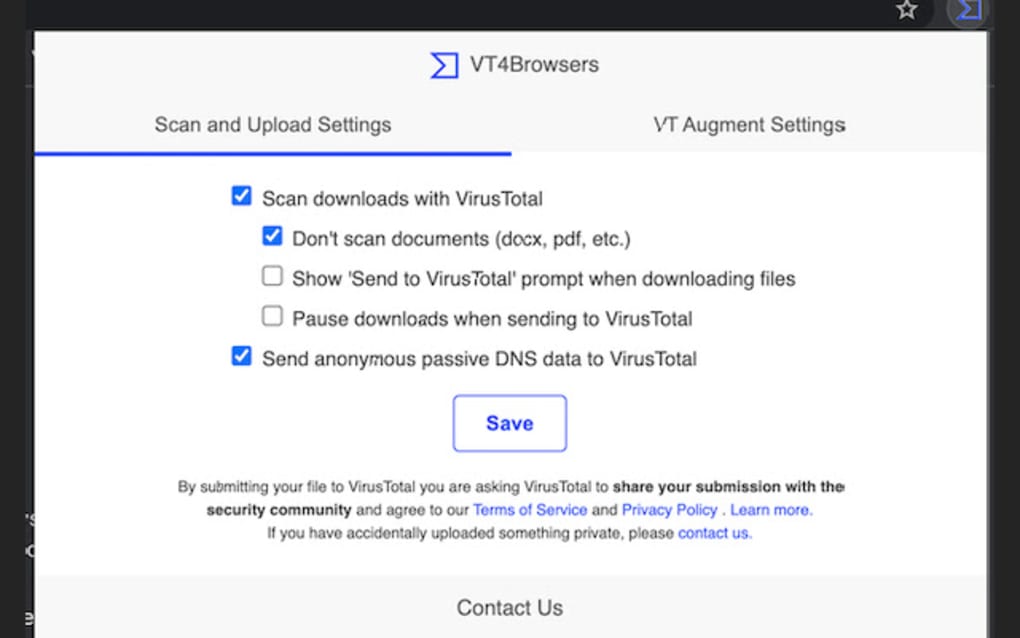
- Customizable Scan Settings: Choose which file types to scan, set size limits, and decide whether to pause downloads during analysis.
- Lightweight & Fast: Minimal impact on browser performance; scans are performed in the cloud, not on your PC.
- Free & No Ads: Completely free to use with no intrusive advertisements or nag screens.
- Secure Data Transmission: Uses HTTPS to send hashes and metadata to VirusTotal, ensuring encrypted communication.
- Integration with Firefox UI: Scan results appear directly in the download bar and context menus for instant visibility.
- Privacy Transparency: Clearly informs users about the data shared with VirusTotal (IP address, domain name, DNS queries).
- Regular Updates: The extension receives automatic updates through Mozilla’s add‑on repository, keeping features current.
Installation & Usage Instructions
Step‑by‑Step Installation
Installing VT4Browsers is as straightforward as adding any other Firefox add‑on. Start by opening the Firefox Add‑Ons Manager (you can reach it by clicking the three‑line menu > “Add‑ons and Themes” or by typing about:addons in the address bar). In the search box, type “VT4Browsers” and press Enter.
Locate the official extension published by VirusTotal and click the Add to Firefox button. A permission dialog will appear, outlining the data the extension needs (access to downloads, browsing history, and the ability to communicate with external servers). Review the permissions, then click Add.
Firefox will download and install the extension, after which a small VT4Browsers icon will appear in the toolbar.
Configuring Your Preferences
Once installed, click the VT4Browsers icon and select Options. Here you can toggle the automatic scan feature, set file‑type filters (e.g., exclude harmless image files), define a maximum file size for scanning, and decide whether to pause a download while the analysis completes. The interface uses clear toggle switches and checkboxes, so you can enable or disable each function without navigating through nested menus. For users who only need occasional checks, simply keep automatic scanning turned off and use the right‑click context menu “Scan with VT4Browsers” on any file link.
Scanning Files and URLs
When you start a download, VT4Browsers automatically submits the file’s hash to VirusTotal. While the scan is in progress, a small status balloon appears in the download panel. Once the cloud engines finish their analysis (usually within a few seconds), the extension displays a colored badge: green for clean, yellow for suspicious, and red for malicious.
If the file is flagged, VT4Browsers offers a quick “Delete” button to remove the download instantly. For URLs, you can either right‑click a link and choose “Scan Link with VT4Browsers” or enable the “Auto‑scan URLs” option in the settings. The extension then sends the URL to VirusTotal, and the result appears as a tooltip next to the link, allowing you to decide whether to proceed.
Best Practices for Secure Browsing
While VT4Browsers adds a robust safety net, it works best when combined with common security habits. Always keep Firefox updated to the latest version, use strong, unique passwords, and consider a reputable endpoint protection solution for layered defense. Remember that the extension shares limited metadata with VirusTotal; if you are working with highly sensitive data, review the privacy policy and consider disabling automatic scans for confidential files. By following these practices, VT4Browsers becomes an essential companion for anyone who values a free, reliable way to stay ahead of online threats.
Compatibility, Pros & Cons
Supported Platforms
VT4Browsers is built specifically for the Mozilla Firefox browser, which runs on Windows, macOS, Linux, and Android (Firefox for Android supports a limited set of add‑ons). As long as you have a recent version of Firefox (v78 or newer), the extension will function correctly. The add‑on does not have a standalone desktop client, so it relies entirely on the browser environment. For users who also use Chrome, Edge, or Safari, VirusTotal offers separate extensions, but VT4Browsers remains exclusive to Firefox, ensuring tight integration with Firefox’s UI and permission model.
Pros
- Free and Open: No subscription fees or hidden costs.
- Leverages VirusTotal’s Engine: Access to over 70 antivirus scanners in the cloud.
- Simple UI: Minimalist design, easy to enable/disable features.
- Automatic Scanning: Saves time by scanning downloads without manual intervention.
- Low Resource Usage: Scans are performed remotely, keeping local CPU usage low.
- Regular Updates: Receives frequent updates through Mozilla’s add‑on store.
Cons
- Firefox‑Only: Users of other browsers need a different extension.
- Metadata Sharing: IP address and domain information are sent to VirusTotal, which may raise privacy concerns for highly confidential environments.
- Dependent on Internet: Scans require an active connection; offline scanning isn’t possible.
- Limited Control Over Engine Selection: Users cannot choose specific antivirus engines; results are aggregated by VirusTotal.
- Potential Delay for Large Files: Very large files may take longer to upload and scan, causing a brief pause in the download.
Frequently Asked Questions
Is VT4Browsers completely free to use?
Yes, the extension is free. There are no hidden fees, subscription plans, or premium tiers. All features, including automatic scanning and real‑time threat ratings, are available at no cost.
Can I disable automatic scanning for certain file types?
Absolutely. In the VT4Browsers options panel you can set filters for file extensions, size limits, and even create an exclusion list for trusted sources. This gives you granular control over what gets scanned.
What data does VT4Browsers send to VirusTotal?
The extension transmits the file hash, URL, your public IP address, domain name, and DNS resolution data required for the scan. No personal files are uploaded—only the metadata needed for VirusTotal to perform the analysis.
Will VT4Browsers work on Firefox for Android?
Firefox for Android supports a limited set of extensions, and VT4Browsers is currently available only on the desktop version of Firefox. Mobile users will need to rely on the VirusTotal mobile app or other security solutions.
How accurate are the scan results?
Since VT4Browsers uses VirusTotal’s aggregated engine results, it benefits from the collective detection rates of over 70 antivirus products. While no tool can guarantee 100% detection, the combined intelligence offers a high level of confidence for most common threats.
Conclusion & Call to Action
VT4Browsers delivers a powerful, no‑cost safety net for Firefox users who want to browse, download, and click links with confidence. By tapping into VirusTotal’s massive scanner network, the extension provides fast, reliable verdicts without slowing down your workflow. Its intuitive settings let you tailor the level of protection to match your risk tolerance, while the lightweight design ensures that your browser remains snappy. Although it shares minimal metadata with VirusTotal and is limited to the Firefox ecosystem, the benefits far outweigh these considerations for most home and small‑business users. If you’re looking for a straightforward way to add an extra layer of defense to your daily web activities, VT4Browsers is a solid choice.
Ready to boost your online security? Download VT4Browsers now and start scanning every download and link with the confidence of VirusTotal’s collective intelligence—free, secure, and hassle‑free.







